
If you have been exploring AI writing tools over the past few years, you have probably noticed that the market has become incredibly crowded. There are dozens of platforms promising to revolutionise how you create content, but most of them come with price tags that make your eyes water. This is where Rytr enters the picture as a genuinely interesting alternative. But what is Rytr AI exactly, and why has it gained such a loyal following amongst bloggers, marketers and small business owners who need to produce content regularly without breaking the bank?
In this comprehensive guide, I am going to walk you through everything you need to know about Rytr AI. We will explore what it actually does, how it compares to more expensive competitors, the specific types of content it can generate and whether it lives up to the hype as an affordable solution for everyday content creators. By the end of this article, you will have a clear understanding of whether Rytr is the right tool for your specific needs and budget.
Understanding Rytr AI: The Basics
To answer the question “What is Rytr AI?” properly, we need to start with the fundamentals. Rytr is an artificial intelligence writing assistant that uses advanced language models to help you generate various types of written content quickly and efficiently. Unlike simple grammar checkers or basic text editors, Rytr uses machine learning technology to understand context, tone and writing style, then produces original content based on the instructions you provide.
The platform was launched in 2021 by a team that recognised a significant gap in the market. Whilst powerful AI writing tools existed, most of them were priced far beyond what individual content creators, solopreneurs and small businesses could reasonably afford. Rytr positioned itself as the affordable alternative that did not compromise on quality, offering a free tier and paid plans that cost significantly less than competitors, whilst still delivering genuinely useful results.
What makes Rytr particularly interesting is its focus on practicality over flash. The interface is clean and straightforward, rather than overwhelming you with dozens of complicated features you will never use. You select the type of content you want to create, provide some basic information about your topic and let the AI generate text based on your requirements. It is designed to be intuitive enough for complete beginners, whilst still offering enough flexibility and control for more experienced users who know exactly what they want.
The technology behind Rytr is built on natural language processing models that have been trained on vast amounts of text data from across the internet. This training allows the AI to understand patterns in how language works, recognise different writing styles and tones and generate text that sounds natural rather than robotic or awkwardly phrased. Whilst Rytr does not disclose the exact models it uses, the platform clearly benefits from the massive improvements in AI language technology that have emerged over recent years.
If you want to see how Rytr performs in real-world usage and whether it makes sense for your specific content needs, I have created a detailed Rytr review that walks through every feature
What Can Rytr AI Actually Create?
One of the most important questions when evaluating any AI writing tool is understanding what it can actually produce. Rytr offers over 40 different use cases and templates designed to handle the most common types of content that businesses and content creators need on a regular basis.
Blog Content And Articles
Rytr can generate blog post outlines, introductions, full article sections and conclusions. You provide the topic and some key points you want covered, then Rytr produces paragraphs that you can use as a starting point or incorporate directly into your writing. The quality varies depending on how specific your instructions are, but for generating first drafts or overcoming writer’s block, it handles this task reasonably well.
The blog writing features work particularly well when you are creating informational content, how-to guides or explanatory articles. You will still need to edit and refine what Rytr produces, but having a solid foundation to work from can cut your writing time significantly compared to staring at a blank page trying to figure out how to start.
Social Media Content
Rytr includes specific templates for various social media platforms, including Facebook, Instagram, Twitter (now X), LinkedIn and others. You can generate post ideas, captions, hashtag suggestions and even full posts tailored to the character limits and style conventions of different platforms.
This is particularly useful if you are managing multiple social media accounts and need to produce fresh content consistently. Rather than spending an hour trying to craft the perfect caption for an Instagram post, you can use Rytr to generate several options in seconds, then choose the one that resonates best or combine elements from multiple suggestions.
Marketing Copy And Sales Content
Rytr offers templates for product descriptions, email marketing campaigns, sales letters, landing page copy, ad copy for platforms like Google Ads and Facebook Ads and more. These templates are designed to follow proven copywriting formulas that tend to convert well, such as AIDA (Attention, Interest, Desire, Action) and PAS (Problem, Agitate, Solution).
For small business owners and entrepreneurs who cannot afford to hire professional copywriters, these features provide a practical way to create marketing materials that at least follow basic persuasive writing principles. The output may not match what a skilled human copywriter would produce, but it gives you a solid starting point that you can refine.
Website Content
Need content for your website? Rytr can help generate About pages, product descriptions, service descriptions, FAQ sections and other standard website copy. Again, you will want to personalise and refine what the AI produces, but having that initial draft saves considerable time compared to creating everything from scratch.

Other Content Types
Beyond the major categories above, Rytr can also assist with creating video descriptions, podcast show notes, press releases, job descriptions, business pitch ideas, interview questions, song lyrics (though this is admittedly a more specialised and experimental feature) and various other text-based content types.
The key point here is understanding that Rytr works best as a writing assistant rather than a complete replacement for human writing. It excels at generating first drafts, providing structure and helping you overcome the initial resistance of starting from nothing. For final polished content, you will still need to apply your own expertise, judgement and editing skills.
How Rytr AI Compares To Other AI Writing Tools
To truly understand what Rytr AI is and where it fits in the landscape of content creation tools, we need to look at how it stacks up against the competition. The AI writing tool market has exploded in recent years, with dozens of platforms vying for attention. How does Rytr compare to the bigger names?
Rytr Versus ChatGPT
ChatGPT is probably the most well-known AI tool available today, and many people wonder why they should pay for Rytr when ChatGPT offers a free version. The answer comes down to specialisation and workflow. ChatGPT is a general-purpose conversational AI that can handle almost any type of query or request. Rytr, by contrast, is specifically designed for content creation workflows.
Rytr provides templates and frameworks tailored to specific content types, which can be faster and more efficient than explaining what you want to ChatGPT in conversational prompts. If you are writing a product description, for example, Rytr’s product description template guides you through providing the exact information needed, then generates copy following e-commerce best practices. With ChatGPT, you would need to craft a prompt explaining what type of product description you want, the tone you are after, and the key features to highlight.
Both tools have their place. ChatGPT excels in exploratory conversations, complex problem-solving and tasks requiring back-and-forth refinement. Rytr excels for quickly generating specific types of marketing and content pieces following established templates.
Rytr Versus Jasper AI
Jasper (formerly Jarvis) is one of the most popular paid AI writing platforms, and it positions itself as a premium solution for serious content creators and marketing teams. Jasper offers more templates, more advanced features and deeper integrations with other tools compared to Rytr. It also comes with a significantly higher price tag, starting at $39 per month and going up from there depending on the plan.
Rytr’s major advantage over Jasper is affordability. The Unlimited plan costs $9 per month (or $7.50 if paid annually), which is a fraction of what Jasper charges. For individual bloggers, freelancers or small business owners working with tight budgets, Rytr provides 80-90% of what Jasper offers at less than a quarter of the price.
The trade-off is that Jasper includes more sophisticated features like Brand Voice (which learns and mimics your specific writing style), more extensive template options and better long-form content capabilities. If you are running a content marketing agency or managing multiple brands, Jasper’s additional features might justify the extra cost. For most solo creators, Rytr’s more modest feature set is perfectly adequate.
Rytr Versus Copy.ai
Copy.ai is another popular AI writing tool that occupies a similar market position to Rytr. Both tools offer free tiers and affordable paid plans. Both focus on marketing copy and content creation. The pricing is comparable, with Copy.ai charging $36 per month for their Pro plan versus Rytr’s $9 per month Unlimited plan.
The main differences come down to interface preferences and specific features. Copy.ai has invested heavily in workflow features and team collaboration tools, making it better suited for agencies and teams working together. Rytr maintains a simpler, more streamlined interface that some users find easier to navigate, particularly if you are working solo.
In terms of output quality, both tools produce similar results because they are built on comparable underlying AI technology. Your choice between the two often comes down to which interface you prefer and whether you need team collaboration features.
Rytr AI Pricing: What Does It Actually Cost?
One of Rytr’s biggest selling points is its pricing structure, which is genuinely accessible for individuals and small businesses. Let us break down exactly what you get at each tier and whether the pricing offers good value compared to alternatives.
Free Plan
Rytr offers a permanently free plan that gives you 10,000 characters per month of AI-generated content. This is roughly equivalent to 5 to 7 average blog posts, depending on length, or dozens of social media posts or product descriptions. The free plan includes access to all 40+ use cases and over 30 languages, which is remarkably generous compared to many competitors that severely restrict features on free tiers.
The free plan is perfect for testing whether Rytr works for your needs before committing to a paid subscription. It is also viable as a permanent solution if you only need AI assistance occasionally rather than for high-volume content production.
Saver Plan
The Saver plan costs $9 per month (or $7.50 per month if you pay annually) and gives you 100,000 characters per month. This is approximately 50 to 70 blog posts’ worth of content, or hundreds of shorter pieces like social media posts, product descriptions and email copy. For the vast majority of individual bloggers, freelance writers and small business owners, this tier provides more than enough capacity.
At this price point, Rytr is cheaper than a single month’s subscription to services like Netflix or Spotify, making it one of the most affordable professional tools you can add to your content creation workflow.
Unlimited Plan
The Unlimited plan costs $29 per month (or $24 per month with annual billing) and removes character limits entirely. You also get access to a dedicated account manager and priority email support. This tier makes sense if you are producing massive volumes of content, managing multiple websites or running a small content agency.
Compared to enterprise-level tools that charge hundreds of dollars per month, Rytr’s Unlimited plan is remarkably affordable even for professional, high-volume use.
How The Pricing Compares
When you put Rytr’s pricing next to competitors, the value proposition becomes clear. Jasper starts at $39/month. Copy.ai charges $36/month for the Pro plan. Writesonic starts at $16/month. Even the more affordable options generally cost at least twice what Rytr charges for comparable (or fewer) features.
The only tool that competes on price is ChatGPT’s free tier, but as discussed earlier, ChatGPT is a general-purpose tool rather than a specialised content creation platform with tailored templates and workflows.

The User Experience: What Is It Actually Like To Use Rytr?
Understanding what Rytr AI is requires looking beyond features and pricing to examine what the actual day-to-day experience of using the platform feels like. Is it intuitive? Does it save you time? Does it integrate smoothly into your existing workflow?
The Interface And Navigation
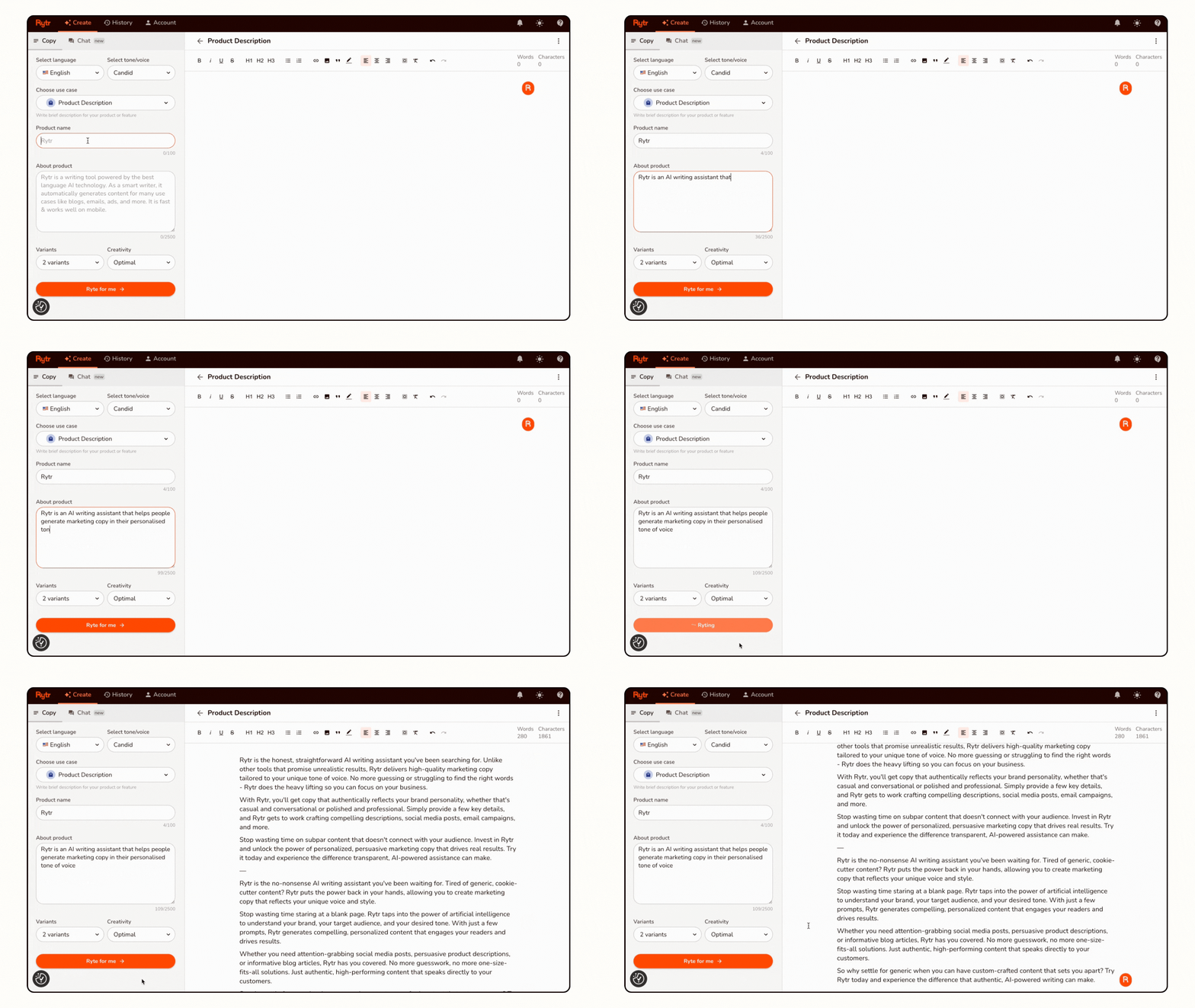
When you first log into Rytr, you are greeted with a clean, uncluttered dashboard. The main workspace is divided into a few key areas: a sidebar where you select your use case and input your instructions, the main editor where your generated content appears and a top menu with settings and account options.
Unlike some competitors that overwhelm you with dozens of buttons, toggles and options, Rytr keeps things simple. You choose what type of content you want to create from a dropdown menu, specify the tone of voice (casual, formal, urgent, convincing and more), pick your output language and provide the basic information or context the AI needs. Then you click generate and wait a few seconds for your content to appear.
This simplicity is both Rytr’s strength and, for some users, its limitation. If you want granular control over every aspect of the AI’s output, you might find Rytr’s streamlined approach too basic. For most users, though, particularly those who just want to generate content quickly without fiddling with complex settings, the straightforward interface is a breath of fresh air.
The Content Generation Process
The actual process of generating content with Rytr follows a predictable pattern. You start by selecting your use case. Let us say you want to write a blog post introduction. You choose “Blog Idea & Outline” or “Paragraph” from the use case menu, then provide your primary keyword or topic. You can also add context points, which are additional details you want the AI to consider when generating text.
After clicking generate, Rytr typically produces 3 to 5 variations of the content you requested within a few seconds. You can then select the variation you like best, regenerate if you are not satisfied with any of the options, or manually edit the text right there in the editor.
The multi-variation approach is genuinely useful because it gives you options rather than forcing you to work with a single output that might not quite hit the mark. You can often find usable pieces in multiple variations and combine them into something better than any single option.
Built-In Tools And Features
Beyond basic content generation, Rytr includes several helpful built-in tools. The plagiarism checker allows you to verify that your content is original (this requires additional credits). The SEO analyser evaluates your content against a target keyword and provides suggestions for improvement. There is also a built-in rich text editor that lets you format your content, add links and prepare it for publishing without needing to switch to another application.
These additional features add meaningful value to the platform. Rather than generating text in Rytr, then copying it to Google Docs for editing, then running it through a separate plagiarism checker, then evaluating it with an SEO tool, you can handle most of your workflow in one place.

The Strengths And Limitations Of Rytr AI
No tool is perfect for every situation, and understanding both what Rytr does well and where it falls short will help you make an informed decision about whether it suits your needs.
What Rytr Does Really Well
Affordability: This is Rytr’s standout strength. At $9 per month for 100,000 characters, it is the most budget-friendly professional AI writing tool available. For individual creators and small businesses watching their expenses carefully, this pricing makes AI-assisted content creation accessible.
Ease Of Use: Rytr’s interface is genuinely intuitive. You do not need to watch hours of tutorial videos or read lengthy documentation to start getting useful results. The learning curve is gentle, which means you can start generating content productively within minutes of creating your account.
Language Support: Rytr supports over 30 languages, which is impressive for a tool at this price point. If you create content in multiple languages or serve international audiences, this flexibility is valuable.
Tone Variety: Rytr offers over 20 different tone options, ranging from casual and friendly to formal and urgent. This variety helps ensure your content matches the context where it will be used.
Versatility: With 40+ use cases covering everything from blog posts to job descriptions to song lyrics, Rytr handles a wide range of content types. You do not need multiple specialised tools for different content categories.
Where Rytr Has Limitations
Long-Form Content: Rytr works best for shorter pieces like social media posts, product descriptions, email copy and individual blog sections. If you need to generate complete 2,000-word articles in one go, Rytr is not optimised for that workflow. You would need to generate the article section by section, which works but is more time-consuming than tools specifically designed for long-form content.
Advanced Features: Compared to premium tools like Jasper, Rytr lacks some sophisticated features like Brand Voice learning, advanced SEO workflow integrations and team collaboration tools. For most solo creators, these missing features do not matter, but agencies and larger teams might find the limitations restrictive.
Output Consistency: Like all AI writing tools, Rytr’s output quality can be inconsistent. Sometimes it produces excellent content that needs minimal editing. Other times, the output requires substantial revision or is not useful at all. This inconsistency means you need to approach Rytr as a writing assistant rather than a complete replacement for human writing.
Limited Context Window: Rytr has a relatively limited ability to maintain context across long conversations or projects compared to something like ChatGPT. Each generation is fairly self-contained, which means it is not ideal for iterative back-and-forth refinement of complex ideas.
Understanding these trade-offs helps set realistic expectations. Rytr excels at quickly generating marketing copy, social media content and short-form pieces. It is adequate for blog content if you are willing to work section by section. It is not the right choice if you need advanced features or primarily create very long-form content.

Who Should Actually Use Rytr AI?
Now that we have explored what Rytr is, what it can do and how it compares to alternatives, the obvious question is who should actually consider using this tool. Based on the features, pricing and capabilities, several types of users stand out as ideal candidates.
Individual Bloggers And Content Creators
If you run a blog or create content independently, Rytr is particularly well-suited to your needs. The affordable pricing fits within even modest budgets, and the range of content types covers most of what you will need to produce regularly. Whether you are writing blog posts, crafting social media updates to promote your content or creating email newsletters for your subscribers, Rytr can speed up your workflow without requiring a significant financial investment.
Small Business Owners
Small business owners who need to create marketing content but cannot afford to hire professional copywriters or a full content team will find Rytr invaluable. You can generate product descriptions for your e-commerce site, create ad copy for Facebook or Google campaigns, write email marketing sequences and produce website copy without needing to master copywriting yourself or pay hundreds of dollars to outsource these tasks.
Freelance Writers And Virtual Assistants
Freelancers who provide content creation services can use Rytr to increase their output and take on more clients without burning out. By using AI to generate first drafts and handle routine content tasks, you can focus your human expertise on editing, strategy and the high-value work that clients truly need your judgement for. This allows you to scale your freelance business without proportionally scaling your working hours.
Social Media Managers
Managing social media for multiple brands or accounts requires producing vast quantities of content consistently. Rytr’s social media templates and ability to quickly generate variations of posts make this demanding work more manageable. You can create a week’s worth of social content in an hour or two rather than spending days crafting every post from scratch.
Students And Academics
Whilst you should never submit AI-generated content as your own academic work, students can ethically use Rytr to help overcome writer’s block, generate outlines for essays, brainstorm ideas and create first drafts that they then substantially revise and refine in their own voice. The tool can make the writing process less daunting whilst still ensuring the final work is genuinely yours.

Who Should Probably Look Elsewhere
Rytr is not ideal for everyone. Large agencies managing dozens of client brands will likely need more sophisticated tools with better team collaboration features and brand management capabilities. Professional authors writing books will find the long-form limitations frustrating. Companies requiring enterprise-level security, compliance features and service level agreements will need to look at enterprise-focused platforms.
Understanding where you fit in this spectrum helps you make an informed decision about whether Rytr is the right tool for your situation.
To see whether Rytr fits your specific content creation workflow, I strongly recommend reading through my complete Rytr review, where I break down exactly who will benefit most from this tool
How To Get Started With Rytr AI
If you have decided that Rytr might be a good fit for your content needs, getting started is remarkably straightforward. Here is a practical walkthrough of the setup process and how to start generating your first pieces of content.
Creating Your Account
Visit the Rytr website and click the sign-up button. You can create an account using your email address or sign up through Google for faster access. The registration process takes less than a minute, and you immediately get access to the free plan without needing to provide payment information.
This is a significant advantage over tools that require a credit card upfront even for free trials. You can explore Rytr’s full feature set, test whether it produces content that meets your standards and decide whether to upgrade without any financial commitment.
Navigating The Dashboard
Once logged in, take a few minutes to familiarise yourself with the layout. The left sidebar contains your use case selector, tone options and language settings. The main area in the centre is your editor, where content appears. The top menu provides access to your account settings, billing information and the built-in tools like the plagiarism checker and SEO analyser.
Rytr also provides helpful tooltips and brief explanations throughout the interface, so even if you are not particularly tech-savvy, you should be able to figure out how everything works fairly quickly.
Generating Your First Content
Start with something simple to get a feel for how Rytr works. Try generating a social media post about a topic you are familiar with. Select “Social Media” from the use case dropdown, choose your preferred platform (Facebook, Instagram, LinkedIn, etc.), pick a tone of voice and enter a brief description of what you want the post to be about.
Click generate and watch as Rytr produces several variations. Read through them, notice which elements work well and which need adjustment, then try regenerating with slightly different input parameters. This experimentation helps you learn how to provide better instructions to get better results.

Learning The Optimal Workflow
The most effective way to use Rytr is not to expect perfect final-draft content but rather to use it for specific stages of your writing process. Here is a workflow that works well for many users:
Start by using Rytr to generate an outline or structure for your piece. Then generate individual sections based on that outline. Take the AI-generated sections and edit them substantially, adding your own expertise, examples and personality. Use Rytr again for things like creating compelling headlines or crafting a strong conclusion. Finally, run the finished piece through Rytr’s plagiarism checker and SEO analyser before publishing.
This workflow leverages AI’s strengths (speed, overcoming blank page paralysis, generating structure) whilst still ensuring the final content reflects your expertise and voice.
Common Questions About Rytr AI
After covering the fundamentals of what Rytr is and how it works, let us address some of the most common questions that come up when people are evaluating whether to use this tool.
Is The Content Rytr Generates Plagiarism-Free?
Rytr generates original text based on its training data rather than copying existing content, so the output should be plagiarism-free in the sense that it is not lifted directly from other sources. However, because AI models are trained on vast amounts of internet text, there is always a small possibility that generated content might closely resemble something that exists online.
This is why Rytr includes a built-in plagiarism checker. Before publishing anything important, run it through this checker to verify originality. You should also edit and refine AI-generated content in your own voice, which naturally ensures the final product is unique.
Will Google Penalise AI-Generated Content?
This is perhaps the most frequently asked question about AI writing tools. Google has stated officially that they do not penalise content simply because it was created with AI assistance. What matters to Google is whether the content provides value to users, demonstrates expertise and serves the search intent behind the query.
In practical terms, this means AI-generated content that is thin, unhelpful or clearly created just to manipulate search rankings will perform poorly. AI-generated content that is substantially edited, enhanced with expert insight and genuinely serves readers can perform just as well as human-written content. The key is using AI as a tool to enhance your content creation rather than a shortcut to avoid creating quality content.
Can Rytr Write In Different Languages?
Yes, Rytr supports over 30 languages, including Spanish, French, German, Italian, Portuguese, Russian, Chinese, Japanese, Hindi and many others. The quality of output varies somewhat by language, with English typically producing the best results because English-language text makes up the majority of AI training data. However, for major languages, the quality is generally quite good.
How Does Rytr Compare To Free Tools Like ChatGPT?
ChatGPT is an incredibly powerful tool, and its free tier offers remarkable value. The question is not whether ChatGPT or Rytr is objectively better, but rather which tool better fits your workflow. ChatGPT excels at conversational interactions, complex reasoning and iterative refinement. Rytr excels at quickly generating specific types of marketing and content pieces using pre-built templates.
For many users, the ideal approach is to use both tools for different purposes. Use ChatGPT for brainstorming, research and complex problem-solving. Use Rytr for quickly cranking out social media posts, product descriptions, email copy and other routine content tasks where templates and structure are helpful.

Is Rytr Worth Paying For?
At $9 per month for the Saver plan, Rytr costs less than most streaming services, meal kit subscriptions or productivity apps. If you create content regularly (and most people with websites, social media presence, or online businesses do), then yes, Rytr is absolutely worth the modest investment.
Even if it only saves you one or two hours per month that you would otherwise spend writing content, the time saved justifies the cost. For most users, the time savings are considerably greater than that, making Rytr’s return on investment quite compelling.
Alternatives To Rytr AI Worth Considering
Whilst Rytr offers excellent value for most users, it is worth understanding the broader landscape of AI writing tools so you can make an informed decision. Here are a few alternatives worth considering, and when they might be a better choice than Rytr.
Jasper AI
Jasper positions itself as the premium option for serious content creators and marketing teams. It offers more advanced features, better long-form content capabilities and extensive integrations with other marketing tools. The trade-off is significantly higher pricing starting at $39 per month.
Consider Jasper if you need advanced features like Brand Voice, if you are creating primarily long-form content or if you are managing a content team that needs collaboration features. For solo creators on a budget, Rytr’s more modest capabilities at a fraction of the price usually make more sense.
Copy.ai
Copy.ai is probably Rytr’s closest competitor in terms of positioning and feature set. Both tools focus on marketing copy and content creation, offer generous free tiers and provide affordable paid plans. Copy.ai has invested more heavily in team collaboration features and workflow automation.
The choice between Rytr and Copy.ai often comes down to personal preference regarding the interface and which tool’s specific template selection better matches your needs. Both are good options worth testing.
Writesonic
Writesonic offers a middle ground between Rytr’s ultra-affordable pricing and Jasper’s premium positioning. It includes some advanced features like AI article writing that handles long-form content better than Rytr, but costs more at $16+ per month.
Consider Writesonic if you primarily create blog articles and want a tool specifically optimised for long-form content, but do not want to pay Jasper’s premium prices.
ChatGPT
ChatGPT deserves mention again because its free tier makes it accessible to absolutely anyone. Whilst it lacks Rytr’s specialised templates and content-focused workflow, its conversational interface and ability to handle complex, multi-step requests make it incredibly versatile.
Many content creators use ChatGPT alongside a more specialised tool like Rytr, leveraging each tool’s strengths for different aspects of the content creation process.
To see whether Rytr fits your specific content creation workflow, I strongly recommend reading through my complete Rytr review, where I break down exactly who will benefit most from this tool
Tips For Getting The Best Results From Rytr AI
Understanding what Rytr is and how to use it technically is just the starting point. Getting consistently good results requires learning a few best practices that maximise the quality of the AI’s output.
Be Specific With Your Inputs
The quality of what Rytr generates is directly related to the quality and specificity of the information you provide. Instead of asking for “a blog post about fitness,” specify something like “a blog post introduction about the benefits of strength training for women over 40, with a friendly and encouraging tone.”
The more context and detail you provide, the better Rytr can tailor its output to match what you actually need. Think of it like delegating to an assistant. Vague instructions get mediocre results. Clear, specific instructions get much better results.
Use The Tone Settings Thoughtfully
Rytr’s tone options genuinely affect the style and feel of the generated content. A product description written in a “convincing” tone will be more sales-oriented, whilst the same description in a “casual” tone will feel more conversational and approachable. Experiment with different tones for the same content to see which version resonates best with your audience.
Generate Multiple Variations
Do not settle for the first output Rytr produces. Generate multiple variations and look for the best elements in each one. You can often combine pieces from several variations into something better than any single output. This approach treats Rytr as a brainstorming partner rather than expecting perfection on the first try.

Edit And Enhance The Output
Never publish AI-generated content without editing it first. Add your own expertise, examples and personality. Verify any factual claims. Adjust the phrasing to match your voice. The combination of AI speed and human judgment produces better results than either alone.
Keep Your Target Audience In Mind
Rytr generates content based on your instructions, but it does not inherently know your specific audience. When reviewing and editing output, constantly ask whether this content will resonate with the people you are actually trying to reach. Adjust accordingly.
The Future Of AI Writing Tools And Where Rytr Fits
Understanding what Rytr AI is requires not just examining the tool as it exists today but also considering how it fits into the broader evolution of AI writing technology. The landscape is changing rapidly, and tools that provide good value today may need to adapt significantly to remain relevant tomorrow.
The Rapid Evolution Of AI Technology
AI writing tools have improved dramatically over just the past few years. What seemed remarkable in 2021 looks almost primitive compared to what is possible in 2026. This rapid evolution benefits users because tools like Rytr continuously improve their underlying models, but it also means the competitive landscape shifts quickly.
Rytr’s strategy of positioning itself as the affordable, accessible option gives it a sustainable niche even as the technology evolves. There will always be users who need a budget-friendly tool that covers the basics well, rather than a premium platform with advanced features they will never use.
The Integration Of AI Into Standard Workflows
As AI writing technology becomes more mature and widely adopted, we are seeing it integrated directly into the tools people already use. Google Docs, Microsoft Word and content management systems are adding AI-assisted writing features. Email platforms are incorporating AI-generated response suggestions.
In this environment, standalone AI writing tools like Rytr will need to either offer something meaningfully better than these built-in features or maintain a significant price advantage. Rytr’s extremely affordable pricing gives it a buffer against competition from basic built-in AI features, particularly since it offers more sophisticated templates and content types than most general-purpose writing assistants.
The Continued Value Of Specialisation
Whilst general-purpose AI tools like ChatGPT are incredibly powerful, there remains value in specialised tools designed specifically for content creation workflows. Rytr’s templates, tone options and content-type-specific features provide structure and guidance that accelerates common content tasks in ways that general tools do not.
As long as Rytr continues refining its specialised features whilst maintaining affordable pricing, it should remain relevant and valuable even as the broader AI landscape evolves.

Final Thoughts: Is Rytr AI Right For You?
We have covered a tremendous amount of ground in this guide, exploring what Rytr AI is from multiple angles. Now it is time to bring it all together and help you decide whether Rytr makes sense for your situation.
Rytr is an affordable, accessible AI writing assistant that excels at helping you create short-form marketing and social content quickly. It offers excellent value at $9 per month, provides a genuinely useful free tier and handles the most common content creation tasks that bloggers, small business owners and freelancers face regularly.
It is not the most powerful AI writing tool available. It lacks some advanced features that premium competitors offer. It works best for shorter content pieces rather than long-form articles. But for the majority of individual creators and small businesses, these limitations matter far less than Rytr’s affordable pricing and ease of use.
If you create content regularly, if you work with a limited budget and if you want a tool that delivers solid results without requiring extensive learning or configuration, Rytr is worth trying. Start with the free plan, test it on your actual content needs and see whether it saves you time and effort. If it does, the $9 monthly investment for the paid plan is one of the better bargains in the content creation tool space.
To make an informed decision about whether Rytr specifically meets your needs, I encourage you to check out my detailed Rytr review, where I demonstrate exactly what the tool can and cannot do
Conclusion
So, what is Rytr AI? It is a practical, affordable AI writing assistant designed to help everyday content creators produce marketing copy, social media content, blog posts and various other types of written material more quickly and efficiently than writing everything manually from scratch. It occupies a specific niche in the AI writing tool market: providing genuinely useful functionality at a price point that individual creators and small businesses can actually afford.
Rytr is not going to replace skilled human writers or copywriters. It is not the most advanced AI writing platform available. But it is an excellent tool for its intended purpose, offering remarkable value for money and helping thousands of users create content more efficiently without breaking their budgets.

Whether Rytr is the right choice for you depends on your specific needs, workflow and budget. If you create content regularly, if affordability is a priority and if you want a straightforward tool that does the basics well, Rytr deserves serious consideration. The free plan eliminates any risk in trying it, so there is no reason not to test it with your actual content needs and see whether it earns a place in your workflow.
For most people asking what is Rytr AI and whether it is worth using, the answer is a clear yes. It is one of the best values available in the AI writing tool space, and its combination of affordability, ease of use and practical features makes it an excellent choice for individual creators and small businesses looking to create content more efficiently in 2026.