
The Template Decision That Impacts Everything
When you’re trying to decide between ClickFunnels landing page templates, you’re not just choosing colours and layouts. You’re making a strategic decision that will directly impact your conversion rates and ultimately your revenue. The template you select becomes the foundation of every visitor’s experience and every purchasing decision. Choose well and you accelerate your path to profitability. Choose poorly and you’ll struggle to convert even the most qualified traffic.
ClickFunnels offers hundreds of templates across dozens of categories. This abundance is simultaneously helpful and overwhelming. How do you know which template will actually convert your specific audience? What makes one template better than another? Should you choose based on aesthetics or proven performance data? And most importantly, which template is genuinely the best for your particular business model and goals?
I’ve spent considerable time analysing ClickFunnels templates, studying their performance across different industries and testing them with real traffic. This comprehensive guide will break down the top-performing templates in each major category, explain what makes them effective and help you choose the template that will work best for your specific situation.
By the end of this analysis, you’ll understand exactly which template to choose, how to customise it for maximum conversions and what mistakes to avoid that sabotage even the best templates.
Check out my complete ClickFunnels review with honest analysis of features and pricing
Understanding ClickFunnels Template Categories
Before evaluating specific templates, you need to understand how ClickFunnels organises its template library.

The Main Template Categories
Sales Letter Templates Long-form sales pages designed for detailed product explanations. These work best for:
- Complex products require extensive education
- Higher-priced items (£200+)
- Sceptical audiences needing persuasion
- Information products and courses
Video Sales Letter (VSL) Templates: Templates centred around video presentations. Ideal for:
- Webinar replays and automated webinars
- Product demonstrations
- Story-based selling
- High-ticket offers
Squeeze Page Templates: Simple opt-in pages focused purely on email capture. Perfect for:
- Building email lists
- Offering lead magnets
- Webinar registration
- Free trial signups
Product Launch Templates: Multi-page sequences designed for product launches. Best for:
- New product introductions
- Time-limited campaigns
- Building anticipation
- Creating scarcity
Application Funnel Templates: Qualification-focused pages for high-ticket services. Suitable for:
- Coaching and consulting
- Done-for-you services
- Strategic partnerships
- Masterminds and programmes
Webinar Registration Templates: Dedicated templates for webinar signups. Optimised for:
- Live webinar promotion
- Automated webinar evergreen funnels
- Workshop registrations
- Training event signups
How Templates Are Structured
ClickFunnels templates typically include:
- Hero section with headline and call-to-action
- Benefits section explaining the value proposition
- Social proof section with testimonials or client logos
- Feature breakdown demonstrating capabilities
- Pricing section showing offers and guarantees
- FAQ section addressing common objections
- Final call-to-action with urgency elements
Understanding this structure helps you evaluate whether a template includes all necessary conversion elements.
The Top-Performing Sales Letter Templates
Let’s examine the highest-converting sales letter templates and what makes them effective.
Template 1: “Classic Sales Letter”
Why It Works: This template uses the timeless long-form sales letter format that has generated millions in revenue across industries. The layout guides visitors through a logical persuasion sequence.
Key Features:
- Long-scrolling single-page design
- Multiple benefit-focused sections
- Strategic repetition of call-to-action
- Social proof is interspersed throughout
- Guarantee prominently displayed
Best For:
- Information products (courses, ebooks, training programmes)
- Mid-ticket items (£100-500)
- Audiences familiar with long-form sales letters
- Detailed product explanations
Conversion Benchmarks: Industry averages show this template converting at 2-4% for cold traffic and 8-12% for warm traffic (email subscribers).
Customisation Priorities:
- Replace generic headline with benefit-specific promise
- Add industry-relevant testimonials
- Customise the guarantee to match your offer
- Update imagery to show your actual product/results
- Modify the pricing section for your offer structure

Template 2: “Perfect Webinar Letter”
Why It Works: Based on Russell Brunson’s Perfect Webinar framework, this template replicates the webinar experience in written form. It’s particularly effective because it follows a proven psychological sequence.
Key Features:
- Story-driven opening that builds rapport
- Problem agitation before solution presentation
- Stack section building perceived value
- Strategic pricing reveals with urgency
- Multiple bonus offerings
Best For:
- High-ticket products (£500-2,000+)
- Transformational offerings
- Audiences who missed your live webinar
- Complex solutions require education
Conversion Benchmarks: Typically converts at 1-3% for cold traffic, but can hit 15-20% for highly engaged email subscribers who attended your webinar.
Customisation Priorities:
- Personalise the story section with your authentic journey
- Update the “3 secrets” framework with your unique insights
- Add specific results and transformations
- Customise the stack to match your actual offer components
- Create genuine scarcity (limited spots, time-bound bonuses)
Template 3: “Product Launch Formula”
Why It Works: This template implements Jeff Walker’s Product Launch Formula structure, building anticipation and desire before presenting the offer.
Key Features:
- Multiple touchpoint design (pre-launch content)
- Seed launch framework with social proof development
- Reciprocity-based persuasion
- Community and movement positioning
- Launch event countdown elements
Best For:
- New product introductions
- Rebranding or repositioning
- Building audience excitement
- Creating viral sharing opportunities
Conversion Benchmarks: When used as part of a complete launch sequence, can achieve 5-10% conversion rates on launch day.
Customisation Priorities:
- Develop pre-launch content that builds curiosity
- Create authentic behind-the-scenes glimpses
- Feature early adopter testimonials prominently
- Build social proof through launch tracking
- Implement genuine countdown timers
Check out my complete ClickFunnels review with honest analysis of features and pricing
The Highest-Converting Video Sales Letter Templates
Video-focused templates require different evaluation criteria. Let’s examine the best performers.
Template 1: “Bridge Page VSL”
Why It Works: This minimalist template eliminates all distractions, forcing visitors to watch your video before seeing your offer. According to research from Wistia, video on landing pages can increase conversion rates by up to 80%.
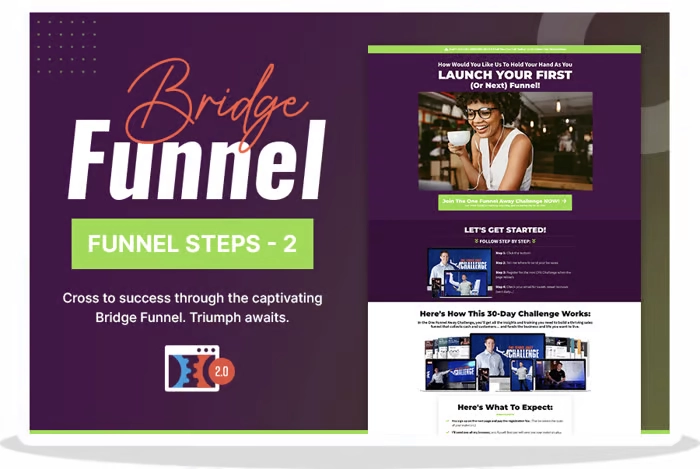
Key Features:
- Single video above the fold
- Minimal navigation to prevent exits
- Call-to-action only appears after the video
- Progress bar showing video length
- Mobile-optimised video player
Best For:
- Story-based selling
- Demonstrations requiring visual proof
- Personal brand positioning
- Webinar replays
Conversion Benchmarks: Average 3-6% conversion for engaged viewers who watch at least 50% of the video.
Customisation Priorities:
- Ensure video loads quickly and plays automatically (muted)
- Add closed captions for accessibility and silent viewing
- Place strategic call-to-action at the exact moment of highest engagement
- Test video lengths (shorter often outperforms longer)
- Use a thumbnail image that creates curiosity
Template 2: “VSL with Sidebar”
Why It Works: This template balances video content with visible social proof and guarantees, reducing risk perception while viewers watch.
Key Features:
- Video positioned left with sidebar right
- Testimonials are visible without scrolling
- Trust badges and guarantees are prominent
- Order form accessible immediately
- Benefits summary reinforcing video messages
Best For:
- Sceptical audiences needing multiple proof points
- Complex products require both video and written explanations
- Higher-priced offerings
- B2B services
Conversion Benchmarks: Typically converts 4-7% for traffic that watches video combined with reading sidebar content.
Customisation Priorities:
- Match sidebar messaging to video script
- Feature the most powerful testimonial at the top of the sidebar
- Add trust signals relevant to your industry
- Ensure the mobile version reorganises effectively
- Test sidebar position (right vs. left)
The Best Squeeze Page Templates for List Building
Lead capture is foundational to most businesses. These templates excel at building email lists.
Template 1: “Minimalist Squeeze”
Why It Works: By eliminating everything except the value proposition and opt-in form, this template removes decision paralysis. The psychology is simple: less friction equals more conversions.
Key Features:
- Single headline and subheadline
- One image or video
- Two-field form (name and email only)
- Single call-to-action button
- No navigation or exit opportunities
Best For:
- High-traffic scenarios where simplicity wins
- Strong offers that speak for themselves
- Mobile traffic optimisation
- A/B testing variations quickly
Conversion Benchmarks: Can achieve 30-50% conversion rates with compelling lead magnets and targeted traffic.
Customisation Priorities:
- Write a benefit-focused headline (not feature-focused)
- Use imagery showing the lead magnet or result
- Test button colours for maximum contrast
- Optimise button text (test “Send Me the Guide” vs. “Get Instant Access”)
- Remove any unnecessary elements
Template 2: “Preview Squeeze”
Why It Works: This template shows preview content from your lead magnet, increasing perceived value and desire before asking for contact information.
Key Features:
- Headline and benefit statement
- Preview of lead magnet (first page, table of contents, sample video)
- Multiple benefit bullets
- Social proof (number of downloads)
- Prominent opt-in form
Best For:
- Comprehensive lead magnets (ebooks, courses, toolkits)
- Audiences that need proof before opting in
- Competitive niches where trust is essential
- Higher-quality lead generation
Conversion Benchmarks: Typically converts 20-35% with preview content increasing perceived value.
Customisation Priorities:
- Show genuinely valuable preview content
- List specific benefits rather than vague promises
- Add social proof (“Join 10,000+ subscribers”)
- Include trust signals (privacy statement)
- Make preview content scannable and enticing
Check out my complete ClickFunnels review with honest analysis of features and pricing
Application Funnel Templates for High-Ticket Offers
High-ticket services require different templates focused on qualification rather than immediate sale.
Template 1: “Two-Step Application”
Why It Works: By breaking the application into two stages (initial interest then detailed qualification), this template increases completion rates while gathering necessary information.
Key Features:
- Stage 1: Brief form (3-4 questions)
- Stage 2: Detailed application (8-12 questions)
- Progress bar showing completion
- Qualification questions filtering unqualified leads
- Calendar scheduling integration
Best For:
- Coaching and consulting services (£3,000+)
- Done-for-you services
- Strategic partnerships
- High-touch programmes
Conversion Benchmarks: Stage 1 typically converts 15-25%. Of those, 60-70% complete Stage 2, resulting in 10-15% total conversion to a qualified application.
Customisation Priorities:
- Make Stage 1 extremely simple and quick
- Use qualifying questions that pre-frame your process
- Set clear expectations about next steps
- Add a video introducing you and explaining the application process
- Include testimonials from previous clients
Template 2: “Video Application Funnel”
Why It Works: Video introduction builds rapport before asking for an application, increasing trust and application quality.
Key Features:
- Personal video explaining programme
- Clear qualification criteria
- Application form below the video
- FAQ section addressing common concerns
- Calendar booking for accepted applicants
Best For:
- Personal brand coaches
- Consultants selling expertise
- Masterminds and group programmes
- Services requiring relationship fit
Conversion Benchmarks: Video increases application completion by 25-40% compared to text-only application pages.
Customisation Priorities:
- Record authentic video (not overly scripted)
- Clearly state who is and isn’t a fit
- Explain the application process and timeline
- Feature relevant success stories
- Make calendar scheduling seamless
Webinar Registration Templates That Fill Seats
Webinar registration requires specific template characteristics focused on event promotion.
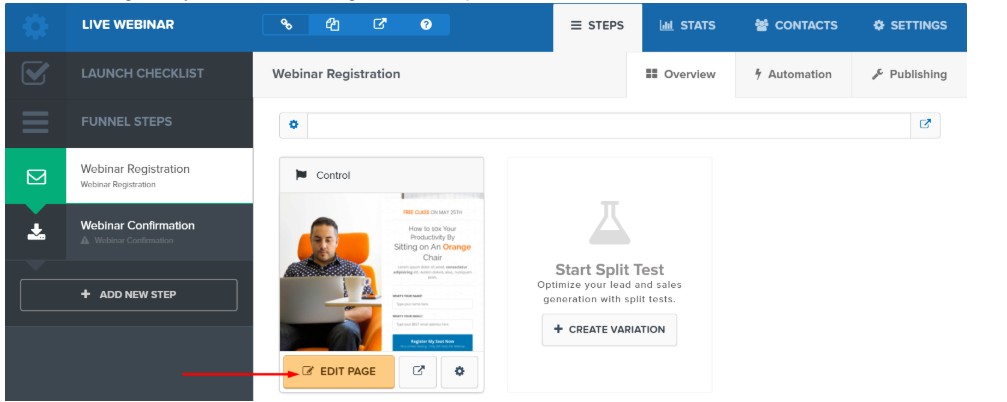
Template 1: “Standard Webinar Registration”
Why It Works: This template balances information about the webinar with simplicity of registration, optimising for sign-ups without overwhelming visitors.
Key Features:
- Compelling webinar title and benefit headline
- Date/time selector for live webinars
- Brief bullet points of what attendees learn
- Host credentials and photo
- Registration form above the fold
Best For:
- Live webinar promotion
- Educational content marketing
- Lead generation webinars
- Product demonstrations
Conversion Benchmarks: Well-promoted webinar registration pages convert 30-50% of targeted traffic.
Customisation Priorities:
- Write curiosity-driven headlines
- Use “what you’ll learn” bullets (not “what I’ll teach”)
- Add host credibility (credentials, past webinar stats)
- Include social proof (registration counter)
- Make time zone selection automatic
Template 2: “Automated Evergreen Webinar”
Why It Works: By creating urgency through “just-in-time” webinar scheduling, this template maintains high conversion rates without live webinar requirements.
Key Features:
- Dynamic scheduling showing the next available time
- Urgency messaging (“Only 3 spots remaining”)
- Countdown timer to next session
- On-demand promise if the deadline is missed
- Simplified registration process
Best For:
- Evergreen sales funnels
- Scalable lead generation
- International audience accommodation
- Passive income strategies
Conversion Benchmarks: Automated webinar registration converts 25-40% with proper scarcity implementation.
Customisation Priorities:
- Ensure countdown timers function properly
- Make scarcity believable (don’t claim 2 spots for months)
- Offer genuine value in webinar content
- Create a compelling preview of the webinar topic
- Test different scheduling windows
Check out my complete ClickFunnels review with honest analysis of features and pricing
# Ready to Build Your Online Business?
Choosing the right ClickFunnels template is important, but it’s just one piece of building a successful online business. If you’re looking for comprehensive guidance on creating a complete business system from strategy to execution, I’ve created a step-by-step getting started guide that covers everything you need to know.
And if you want to understand whether ClickFunnels is the right platform for your business, check out my complete ClickFunnels review with honest analysis of features, pricing and real-world performance.
Template Customisation Strategies for Maximum Conversions
Templates are starting points, not finished products. Customisation determines your actual conversion rates.
Customisation Priority 1: Headlines That Actually Work
The template’s default headline is generic. Your headline must be specific, benefit-focused and compelling.
Weak Headline (Template Default): “Discover Our Amazing Product”
Strong Headline (Customised): “How 2,847 Small Business Owners Generated an Extra £50,000 in Revenue Using This Simple System”
The strong headline includes:
- Specific social proof (2,847 people)
- Quantified benefit (£50,000)
- Implied ease (simple system)
- Relevance (small business owners)
Customisation Priority 2: Social Proof That Builds Trust
Templates include placeholder testimonials. Replace these with genuine, specific testimonials.
Weak Testimonial (Generic): “This product is great! I love it.” – John S.
Strong Testimonial (Specific): “Within 30 days of implementing this system, I signed three new clients worth £15,000. The email templates alone saved me 10 hours of work.” – Sarah Mitchell, Marketing Consultant, London
Strong testimonials include:
- Specific results and timelines
- Quantified outcomes
- Full name and relevant credentials
- Location (builds trust)
Customisation Priority 3: Calls-to-Action That Drive Action
Template CTAs are often vague. Customise them to be specific and benefit-focused.
Weak CTA: “Click Here” or “Submit”
Strong CTA: “Send Me the Free Toolkit” or “Book My Strategy Session”
Strong CTAs:
- Use first-person language (“My”, not “Your”)
- State the exact benefit received
- Create urgency when appropriate
- Use action verbs
Customisation Priority 4: Images That Reinforce Messages
Replace stock photos with relevant imagery:
- Actual product screenshots
- Real customer photos (with permission)
- Behind-the-scenes content
- Results and transformations
According to research from Nielsen Norman Group, authentic imagery builds trust while stock photos are often ignored or reduce credibility.
Customisation Priority 5: Mobile Optimisation
Templates are mobile-responsive but often need adjustment:
- Test the actual mobile experience
- Ensure text is readable without zooming
- Verify buttons are large enough to tap easily
- Check image load times on mobile data
- Simplify forms for mobile completion
Over 60% of traffic comes from mobile devices. Mobile performance is non-negotiable.
Common Mistakes That Sabotage Even the Best Templates
Great templates can still produce poor results if you make these mistakes.
Mistake 1: Using Templates Without Customisation
Many people choose a template, change the logo and consider it done. This produces generic pages that blend into the noise.
Solution: Allocate at least 4-6 hours to customising every element of your chosen template. Write unique copy, add genuine social proof and ensure everything reflects your brand.
Mistake 2: Ignoring Page Speed
Beautiful templates are useless if they take 5+ seconds to load. Slow pages kill conversions.
Solution:
- Compress all images before uploading
- Limit use of custom fonts
- Minimise external scripts and embeds
- Use ClickFunnels’ built-in CDN properly
- Test page speed on multiple devices
Mistake 3: Overwhelming Visitors with Choices
Some templates include multiple offers, numerous links and various calls-to-action. This creates decision paralysis.
Solution: One page equals one goal. Remove navigation menus, eliminate multiple offers and focus entirely on your primary conversion goal.
Mistake 4: Neglecting Above-the-Fold Content
The most important content must be visible without scrolling. Many templates bury the key value proposition.
Solution: Ensure your headline, primary benefit and call-to-action are all visible above the fold on both desktop and mobile.
Mistake 5: Using Templates for the Wrong Purpose
Attempting to use a squeeze page template for product sales or a sales letter template for simple opt-ins creates friction.
Solution: Match template type to your specific goal. Don’t force templates into purposes they weren’t designed for.
Mistake 6: Ignoring Testing
Choosing a template and never testing alternatives leaves performance on the table.
Solution: Use ClickFunnels’ built-in A/B testing to try different templates, headlines, layouts and CTAs. Let data determine what works best.
Check out my complete ClickFunnels review with honest analysis of features and pricing
Industry-Specific Template Recommendations
Different industries benefit from different template types.
For E-Commerce
Best Template Type: Product Launch or Sales Letter templates
Why: E-commerce requires product visualisation, multiple angles, social proof and a clear purchasing process.
Customisation Focus:
- High-quality product photography
- Customer review integration
- Size/variant selectors
- Shipping and return policies are clear
- Trust badges prominent
For Coaching/Consulting
Best Template Type: Application Funnel or VSL templates
Why: Services require relationship building and qualification before sale.
Customisation Focus:
- Personal video introduction
- Detailed service explanation
- Case studies and results
- Clear application process
- Calendar integration
For Course Creators
Best Template Type: Perfect Webinar Letter or VSL templates
Why: Courses require education about transformation and overcoming learning objections.
Customisation Focus:
- Curriculum preview
- Student testimonials and results
- Money-back guarantee
- Bonus material stack
- Payment plan options
For SaaS Products
Best Template Type: Bridge Page VSL or Product Launch templates
Why: Software requires demonstration and trial encouragement.
Customisation Focus:
- Product demo video
- Feature comparison tables
- Free trial prominent
- Integration showcases
- Security and reliability proof
For Affiliate Marketing
Best Template Type: Squeeze Page or Sales Letter templates
Why: Affiliates need list building and pre-selling before external redirect.
Customisation Focus:
- Bonus offerings
- Honest product assessment
- Comparison to alternatives
- Risk reversal language
- Clear affiliate disclosure

Advanced Template Selection Strategy
Beyond individual templates, consider how they work within complete funnels.
The Multi-Page Funnel Approach
Rarely does a single landing page convert optimally. Consider sequences:
Funnel Example 1: Course Launch
- Page 1: Squeeze page (build list with lead magnet)
- Page 2: Video training (deliver value, introduce course)
- Page 3: Sales letter (detailed course explanation)
- Page 4: Order form (simplified checkout)
- Page 5: Thank you page (delivery and upsell)
Each page uses different template types optimised for that step’s specific goal.
The Segmentation Strategy
Use different templates for different traffic sources:
Cold Traffic (Social Media, Paid Ads): Use squeeze pages to build lists rather than attempting direct sales. Cold traffic needs warming.
Warm Traffic (Email Subscribers): Use sales letter or VSL templates. These visitors know you and are more likely to buy.
Hot Traffic (Previous Buyers, Consultation Calls): Use simplified order form templates. Remove unnecessary persuasion for audiences ready to buy.
The Testing Hierarchy
When testing templates, follow this priority:
Test 1: Template Category Does a sales letter outperform VSL for your offer? Test fundamentally different approaches first.
Test 2: Specific Templates Within Category Once you know which category works best, test specific templates within that category.
Test 3: Template Customisations After selecting the best template, test customisations (headlines, images, CTAs).
This hierarchy ensures you’re testing big differences first rather than minor tweaks.
Check out my complete ClickFunnels review with honest analysis of features and pricing
Measuring Template Performance
How do you know if your chosen template is actually working?
Key Metrics to Track
Conversion Rate: Percentage of visitors who complete your desired action. This is your primary metric.
Bounce Rate: Percentage who leave immediately. High bounce rates indicate template mismatch with traffic expectations.
Time on Page: How long visitors spend before converting or leaving. A longer time usually correlates with higher engagement.
Scroll Depth: How far down the page visitors scroll. Identifies where people lose interest.
Click-Through Rate on CTAs: What percentage clicks on your call-to-action buttons? Low CTR indicates weak copy or positioning.
Conversion Rate Benchmarks by Template Type
Squeeze Pages:
- Cold traffic: 20-30%
- Warm traffic: 40-60%
- Hot traffic: 60-80%
Sales Letters:
- Cold traffic: 1-3%
- Warm traffic: 5-10%
- Hot traffic: 15-25%
VSL Pages:
- Cold traffic: 2-5%
- Warm traffic: 8-15%
- Hot traffic: 20-30%
Application Funnels:
- Cold traffic: 5-10%
- Warm traffic: 15-25%
- Hot traffic: 30-40%
If your numbers fall significantly below these benchmarks, your template choice or customisation needs adjustment.
The Template Selection Decision Framework
Use this framework to choose your optimal template:
Step 1: Define Your Primary Goal
What exactly do you want visitors to do?
- Join email list → Squeeze page template
- Purchase product → Sales letter or VSL template
- Register for webinar → Webinar registration template
- Apply for service → Application funnel template
- Schedule call → Application or bridge page template
Step 2: Assess Your Audience Awareness Level
Unaware Audience (Don’t Know They Have a Problem): Use long-form sales letter templates that educate before selling.
Problem-Aware Audience (Know Problem, Exploring Solutions): Use VSL or sales letter templates that position your solution.
Solution-Aware Audience (Know Your Solution Type): Use product launch or sales letter templates focusing on your unique advantages.
Product-Aware Audience (Familiar with Your Product): Use simplified templates with less persuasion and faster paths to purchase.
Step 3: Consider Your Offer Complexity
Simple Offers (Low-Ticket, Easy to Understand): Use minimalist templates that don’t over-explain.
Complex Offers (High-Ticket, Multiple Components): Use detailed sales letter or VSL templates that thoroughly educate.
Step 4: Match Traffic Temperature
Cold Traffic: Start with squeeze pages to build lists rather than immediate sales.
Warm Traffic: Use sales letter or VSL templates designed to convert engaged prospects.
Hot Traffic: Use simplified order form templates for audiences ready to buy.
Step 5: Factor in Your Resources
Limited Time: Choose simpler templates requiring less customisation.
Limited Design Skills: Stick with proven templates rather than attempting heavy modifications.
Limited Budget: Use templates with strong track records to reduce testing expenses.
This framework eliminates guesswork and directs you toward templates most likely to succeed for your specific situation.
Check out my complete ClickFunnels review with honest analysis of features and pricing
Conclusion: Choosing Your Perfect Template
After a comprehensive analysis of ClickFunnels landing page templates, the answer to “which is best?” depends entirely on your specific business model, audience and goals. There is no universally perfect template. The squeeze page that generates 50% opt-in rates for one business might produce 10% for another. The sales letter that converts cold traffic at 5% in one market might struggle at 1% in another.
What matters most isn’t finding the mythical “best template” but rather matching the right template category to your goal, customising it thoroughly for your audience and testing systematically to optimise performance. The minimalist squeeze page templates excel at list building. The detailed sales letter templates work brilliantly for complex, higher-priced offers. The video sales letter templates shine when demonstration and story drive purchasing decisions. The application funnel templates filter and qualify high-ticket service prospects.

Your template selection strategy should follow the decision framework outlined in this guide: define your goal, assess audience awareness, consider offer complexity, match traffic temperature and factor in your resources. This systematic approach eliminates the paralysis of choice and directs you toward templates proven to work in your specific context.
Remember that templates are starting points requiring significant customisation. The businesses generating remarkable results with ClickFunnels aren’t using templates straight out of the box. They’re customising headlines, adding genuine social proof, optimising images, simplifying calls-to-action and testing relentlessly. Your commitment to customisation and optimisation matters far more than which template you start with.
Choose your template thoughtfully using the guidance in this article. Customise it thoroughly to reflect your unique value proposition and brand. Test systematically to identify what resonates with your audience. And most importantly, take action. The perfect template sitting unused generates zero conversions. The good template launched and optimised consistently will build your business.
Stop overthinking which template is “best” and start building with the template that fits your current situation. Your business is waiting.