
How to Grow Your Email List With Pinterest: 7 Proven Tactics
If you have been searching for how to grow your email list with Pinterest, you are in the right place. Most people either rely entirely on SEO, which takes months to deliver results, or they pour energy into social media platforms that bury their content within 48 hours. Pinterest sits in a different category entirely. It works more like a search engine than a social platform, and it can drive a steady stream of qualified visitors to your opt-in pages every day, without you paying a cent in advertising.
This guide walks you through exactly how to use Pinterest to build your email list from scratch, or to seriously accelerate the growth of one you have already started. You will find practical, actionable steps rather than vague advice about “showing up with value.”
Why Pinterest Is One of the Most Underrated List-Building Platforms
Before getting into tactics, it helps to understand why Pinterest is so well-suited to email list growth. Most social platforms show your content primarily to people who already follow you. Pinterest works differently. It surfaces your pins to people who are actively searching for answers to specific questions.
That is a key distinction. Someone who finds your pin after searching “how to start affiliate marketing with no money” is already in the mindset of wanting help. They are far more likely to hand over their email address for a useful free resource than someone who stumbled across a random Instagram post.
Pinterest also has remarkable staying power. According to Hootsuite’s complete Pinterest marketing guide, pins can keep generating traffic months or even years after being published. A single pin that resonates with your audience can keep delivering email subscribers long after you created it.
Compare that to a tweet or an Instagram reel that dies within 48 hours. There is no comparison.
There is also a key point about how Pinterest users behave. Pinterest has over 500 million monthly active users. A large share of those users are in active planning or buying mode.
They are not mindlessly scrolling. They are looking for ideas, solutions and resources. That is exactly the kind of visitor you want on your opt-in page.
If you are unsure how to put that kind of funnel together, the Get Started Here page on this site walks you through the full process in plain, no-nonsense language.
Step 1: Get the Foundation Right Before You Pin Anything
Many people jump straight into Pinterest without having the right infrastructure in place first. Before you create a single pin, you need 3 things sorted.
A focused opt-in landing page. This is a page built around a single offer. No navigation menu, no distractions and no competing calls to action.
Just a clear headline, a brief explanation of what your visitor will get and a sign-up form. Keep it simple and keep it focused.
A lead magnet your audience actually wants. A lead magnet is the free resource you offer in exchange for an email address. According to Mailchimp’s guide to lead magnets, the best ones solve a single, specific problem rather than trying to cover everything.
A checklist, a short guide, a swipe file, a template or a mini email course all work well. The more targeted and actionable your lead magnet is, the better your sign-up rate will be.
An email platform is connected and ready. You cannot collect emails without somewhere to store them. Tools like GetResponse, ConvertKit or Systeme.io all connect easily with opt-in forms.
If the budget is tight, Systeme.io has a genuinely useful free plan. It covers email marketing, landing pages and basic automation all in one place.
Get these 3 elements working together before you invest time in creating pins. Driving Pinterest traffic to a weak or unfocused opt-in page is a waste of effort.
Step 2: Switch to a Pinterest Business Account
If you are currently using a personal Pinterest account, convert it to a business account now. It is completely free and takes about 2 minutes. A business account gives you access to Pinterest Analytics, which shows which pins are generating the most clicks and saves. Without that data, you are working blindly.
A business account also lets you claim your website. This matters because claimed websites get better reach in the Pinterest algorithm. When Pinterest sees that your pins link to a verified website, it treats your content as more trustworthy and shows it to more people.
To convert your account, log into Pinterest, click your profile image in the top right corner and select “Convert to business.” Then claim your website by adding a small verification tag to your WordPress site. Your hosting provider or the official Pinterest Business resources page can walk you through the exact steps if needed.
Once your account is set up, spend 10 minutes on your profile. Use a clear, professional image and write a short bio that explains who you help and what problem you solve. Include your website URL.
Your profile is often the first thing a new visitor sees. Treat it like a brief introduction to your business.
Step 3: Create Boards That Attract the Right People
Your Pinterest boards are not just organisational folders. They send direct signals to the Pinterest algorithm about what your account is focused on. So it pays to be intentional about how you name and structure them.
Choose board names that reflect what your target audience is actively searching for. If your niche is online business, side hustles and affiliate marketing, strong board names might include topics like “Affiliate Marketing for Beginners,” “Online Business Ideas,” “Make Money From Home”, or “Email Marketing Tips.”
Write a keyword-rich description for each board. These descriptions help Pinterest understand your content and match it to relevant searches. Aim for 2 to 3 natural sentences that describe the theme of the board. Include the kinds of phrases your audience would actually type into a search bar.
Start with 5 to 8 tightly focused boards rather than spreading yourself across 20 loosely connected ones. A focused, well-organised account outperforms a scattered one every time. You can expand your board range later as your content library grows.

Step 4: Design Pins That Stop the Scroll
Pinterest is a visual platform. The quality of your pin design has a direct impact on how many clicks you receive. The good news is that you do not need design experience or expensive software to create effective pins. Canva has dozens of free Pinterest templates that you can customise in a few minutes.
Here are the design principles that matter most for list-building pins.
Use a vertical format. The optimal pin size is 1000 x 1500 pixels. Vertical pins take up more real estate in the feed, which means more visibility. Square and horizontal pins get crowded out by vertical content.
Include a text overlay. Many Pinterest users scroll quickly without reading captions. A clear, benefit-focused headline directly on the image tells them immediately why they should click. Something like “Free Checklist: Start Your Affiliate Blog in 7 Days” communicates value at a glance.
Keep the design clean. Cluttered, busy pins underperform. A strong image, a bold headline and your website URL in small text at the bottom is usually all you need. Resist the urge to cram in too much information.
Stay visually consistent. Branded pins that use the same colours and fonts across multiple designs become recognisable as people scroll past them repeatedly. Pick 2 or 3 brand colours and use them consistently.
Create at least 3 different pin designs for each piece of content or lead magnet you are promoting. Different designs resonate with different people, and Pinterest rewards visual variety. Multiple designs for the same content also give you more data on which style drives the most clicks.
If you are unsure how to put that kind of funnel together, the Get Started Here page on this site walks you through the full process in plain, no-nonsense language.
Step 5: Write Pin Descriptions That Work as Search Copy
Your pin description is not a throwaway caption. It is a piece of text that Pinterest uses directly to understand what your pin is about and decide which users to show it to. Treat each description as short SEO copy.
Lead with the most important information. Pinterest truncates long descriptions in the feed, so put the value you are offering in the first sentence. Include your primary keyword naturally in the opening line.
Here is a simple example of an effective description for a pin promoting a free beginner’s guide to affiliate marketing:
“Want to earn your first $1,000 online without creating your own product? Download this free beginner’s guide to affiliate marketing and get a step-by-step breakdown of exactly what to do first. Perfect for complete beginners working from home.”
This description uses a curiosity-driven hook, includes a relevant keyword and clearly states who the content is for. That last point matters because Pinterest uses audience behaviour signals to recommend your content to similar users.
Keep descriptions between 100 and 200 words. Include 3 to 5 relevant keywords woven in naturally. Avoid stuffing keywords awkwardly, as this looks spammy and can actively reduce your reach.
Creating a consistent flow of pin descriptions and blog posts is far easier with the help of an AI writing tool. Rytr is one of the most affordable options on the market, making it a practical choice for beginners who want to produce quality content without spending a fortune.

Step 6: Pin Directly to Your Opt-In Page
This is one of the most important points in this entire article. Most people use Pinterest to drive traffic to blog posts, which is a perfectly valid strategy. But if growing your email list is the priority, you also need pins that link directly to your opt-in landing page.
When someone clicks a pin and lands on a page with a single, clear offer, you remove all the friction between the click and the sign-up. They do not need to hunt for your opt-in form buried at the bottom of a long article. It is right in front of them the moment they arrive.
Create 3 to 5 different pin designs for each lead magnet you offer. These pins should lead directly to the dedicated landing page for that specific freebie. The image and description should focus entirely on the lead magnet itself, describing what it is, who it is for and what problem it solves.
For example, if your lead magnet is a free PDF called “The Beginner’s Checklist to Making Your First $1,000 in Affiliate Marketing,” your pin image should feature that checklist visually. The description should explain what is inside and who will benefit from downloading it. The link goes directly to your opt-in page. No detours.
If you are unsure how to put that kind of funnel together, the Get Started Here page on this site walks you through the full process in plain, no-nonsense language.
Step 7: Build a Consistent Pinning Habit
Consistency is the single most important factor that separates Pinterest accounts that grow from those that go nowhere. The Pinterest algorithm rewards regular activity. An account that pins 5 to 10 times per day steadily and consistently outperforms one that pins 50 times in a single week and then disappears for a fortnight.
You have 2 practical options for maintaining consistency.
Manual pinning in batches. Set aside 20 to 30 minutes a few times per week to schedule your pins. Pinterest has a built-in scheduling tool that is free to use.
You can queue pins to go out at set times throughout the day. This means you do one session of scheduling rather than logging in multiple times each day.
Using a third-party scheduler like Tailwind. Tailwind is a Pinterest-approved scheduling tool. It lets you plan weeks of content in a single session. Its smart scheduling feature suggests the best posting times based on when your audience is most active.
The basic paid plan starts at around $19.99 per month. There is a free trial if you want to test it first.
Whichever method you use, aim for 5 to 10 pins per day to start. A “fresh pin” does not always mean brand-new content. Different pin designs pointing to the same blog post or landing page count as fresh pins, as long as the images differ. This lets you get more value out of every piece of content you create.

What to Pin: A Sustainable Content Mix for List Growth
Not every pin needs to link directly to an opt-in page. A healthy Pinterest strategy blends different types of content to build trust, drive traffic and capture leads over time.
Around 80% valuable content. These are pins that link to helpful blog posts, tutorials or guides related to your niche. They build your credibility and attract the right audience to your account. Readers who find your content genuinely helpful are far more likely to sign up for your email list when they come across your opt-in offer.
Around 20% direct lead magnet pins. These pins do the direct work of converting traffic into subscribers. They link straight to your opt-in landing pages and focus entirely on the value of your free resource.
This balance keeps your account from looking like a series of advertisements while still driving meaningful list growth. Pinterest users come to the platform looking for inspiration and solutions. Give them that consistently, and they will be receptive to your opt-in when they see it.
Also consider creating seasonally relevant content. Certain topics see a predictable spike in search volume at specific times of year. A pin about “new year online business goals” gets far more traction in December and January than at any other time. Planning seasonal content 4 to 6 weeks in advance lets you capture that search traffic at its peak.
How to Track Results and Improve Over Time
Growing an email list without tracking your results means you cannot tell what is working and what is wasting your time. Fortunately, the tools you need are all free.
Pinterest Analytics is the starting point. Log in to your business account and click “Analytics” in the top navigation. You can see which pins are generating the most impressions, saves and link clicks. Focus on the “Link Clicks” metric, as this shows you how many people actually visited your website from each pin.
Go a step further by adding UTM parameters to your pin URLs. A UTM tag is a small piece of text you add to the end of a URL. It tells Google Analytics exactly where a visitor came from.
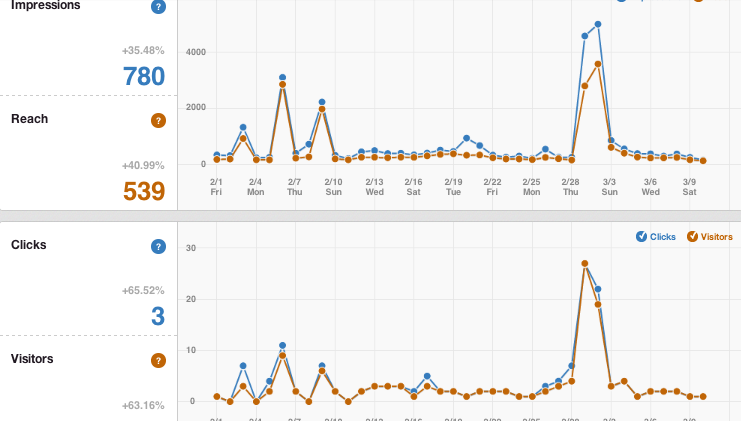
With this in place, Google Analytics can show you how many email sign-ups are coming from Pinterest each month. That makes it easy to judge whether your Pinterest work is turning into real list growth.
Review your Pinterest Analytics weekly. Look for patterns in which pin styles, topics and headlines drive the most clicks. Create more pins in the style of your top performers and drop the formats that fall flat. This approach improves your results without requiring more time or money.
If you are ready to build the full foundation for your online business, including your opt-in funnel, your affiliate strategy and your content plan, head over to the Get Started Here page
Common Mistakes That Slow Down Your List Growth
Even with a solid strategy in place, a few consistent errors can hold people back.
Sending all traffic to the homepage. Your homepage is not designed for email capture. It has too many options and too many competing messages. Always send traffic from lead magnet pins to a dedicated, focused opt-in page.
Creating pins with no clear call to action. Every pin should give the viewer a reason to click. Phrases like “Download the free guide,” “Grab your free checklist” and “Get the free starter kit” are simple and effective. Do not assume people will click without being prompted.
Giving up during the slow period. Pinterest’s growth is not instant. Most accounts start to see real traction after 3 to 6 months of steady effort.
The pins you create today may deliver their peak traffic 6 to 12 months from now. Longevity is one of Pinterest’s biggest strengths. Your content compounds in value rather than vanishing after 48 hours.
Neglecting the profile. A half-finished profile with no bio and no claimed website signals low credibility. Spend 20 minutes getting your profile properly set up before you create any pins. First impressions count, even on Pinterest.

A Realistic Weekly Routine That Fits Around a Day Job
If you are building this business alongside full-time work, you do not have unlimited hours to spend on Pinterest. The good news is that you do not need them. Here is a lean weekly routine that takes roughly 2 hours and delivers consistent results over time.
Once a week (30 minutes): Design 3 to 5 new pins using Canva. Include fresh designs for your current lead magnets and any new blog posts you have published. Aim for visual variety across the batch.
Daily (10 to 15 minutes): Schedule 5 to 7 pins using Pinterest’s built-in scheduler or Tailwind. Mix direct lead magnet pins with content pins pointing to helpful blog posts. Spread them across different times of day rather than publishing everything at once.
Once a week (20 minutes): Review Pinterest Analytics. Identify which pins are getting the most link clicks and note the common themes in your best-performing content. Plan your next batch of pins around those themes.
That totals roughly 2 hours per week. Spread across 6 to 12 months, that level of consistent effort builds into something genuinely valuable. The Pinterest accounts that grow are not the ones that worked hardest in month one. They are the ones that showed up in month nine.
Build the Funnel, Then Let It Work
Knowing how to grow your email list with Pinterest comes down to one clear principle: get the right infrastructure in place, create pins that connect directly with your audience’s problems and show up consistently over a long enough period of time for the platform to reward your effort.
None of this requires a big budget, advanced technical skills or previous experience. What it requires is a realistic plan, the right tools and the patience to let the compound effect do its work. Pinterest pins you create this month may still be delivering email subscribers 18 months from now. That is a genuinely rare quality in the world of online marketing.
If you are ready to build the full foundation for your online business, including your opt-in funnel, your affiliate strategy and your content plan, head over to the Get Started Here page
Everything is explained in plain, honest language with no exaggerated income claims and no unnecessary complexity.
Affiliate Disclosure: This page may contain affiliate links. If you click through and make a purchase, I may earn a commission at no extra cost to you. I only recommend tools and resources I genuinely believe offer real value.